Exclusions: a glossary of six mechanisms
Six different controls in Asymmetry are described as “excluding” or “skipping” part of the data, and the word hides real differences. They operate on different domains (time bins, time points, frequency bins, detectors, whole runs), with deliberately different semantics — one drops data, another de-weights it, others hard-zero it — and they persist under different schema keys. They are not interchangeable, and the most dangerous pair (the two time-window controls) share a label while meaning opposite things. This page is the reference; for the mechanics of each, follow the cross-link.
The six at a glance
Mechanism (GUI label) |
Domain |
Semantics |
Parameterisation |
Schema key |
|---|---|---|---|---|
Count-fit exclude window (Count-domain fitting (α calibration & single histograms) — “Skip window (μs)”) |
time bins |
hard drop from the fit — the bins inside are removed (endpoints inclusive) and contribute nothing to the cost |
\((t_1, t_2)\) μs |
(persisted from reconciliation Phase 2; see note) |
MaxEnt exclude window (Fourier analysis — “De-weight from / to (μs)”) |
time points |
σ-inflate ×10⁸ — the points are de-weighted (error bars blown up) but kept, so the time grid and any derived frequency resolution are unchanged |
\((t_1, t_2)\) μs |
|
Fourier exclusion ranges (Frequency-domain conditioning — “Exclusions” table) |
frequency bins |
hard zero of the displayed spectrum inside each window |
centre ± half-width |
|
Diamagnetic band (Frequency-domain conditioning — “Diamagnetic line”) |
frequency bins |
hard zero of the displayed spectrum (a derived special case of the exclusion ranges, centred on the run’s Larmor frequency) |
derived centre ± half-width |
|
Detector exclusion (Detector exclusion — “Exclude Detectors”) |
detectors |
drop the detector from every group sum at reduction time; raw histograms untouched |
1-based id list (e.g. |
|
Scan-point exclusion (Integral scan mode (avoided-level-crossing field scans) — click a point on an integral scan) |
whole runs |
drop the run’s point from the field scan’s baseline/peak/RF fits; still drawn (greyed) so it can be clicked back |
clicked run numbers |
|
Three semantics, not one
The six controls realise only three underlying operations, and confusing them changes the result:
Drop (count-fit window, detector exclusion, scan-point exclusion) removes data from the calculation entirely. A dropped time bin does not enter the fit cost; a dropped detector does not enter any group sum; an excluded scan point does not enter the baseline, peak, or RF fit (though it stays drawn, greyed, so you can restore it).
De-weight (MaxEnt window) keeps the data on the grid but inflates its error by a factor of \(10^8\) so it carries essentially no weight. The grid spacing — and therefore the FFT/MaxEnt frequency resolution derived from it — is preserved. This is the crucial difference from a drop.
Hard-zero (Fourier exclusion ranges, diamagnetic band) sets the displayed spectrum to zero inside a frequency window. It is a display operation on a computed spectrum, not a change to the transform or the fit input.
Warning
The two time-window controls share a label but mean opposite things. Both the count-fit and MaxEnt windows are labelled in μs with a \((t_1, t_2)\) start/end, but the count fit drops its bins while MaxEnt de-weights its points and keeps the grid. Setting “the same” window in both panels does not do the same thing: the count fit loses those bins from the statistics; MaxEnt keeps its frequency resolution intact and merely stops trusting the excluded stretch. Read the panel each control lives in, not just the number.
When to reach for each
Count-fit / MaxEnt time windows — to reject a corrupted interior stretch (a laser flash, an RF burst, a detector glitch) from a single run’s analysis without splitting the run. Use the count-fit window when you want those bins gone from a count fit; use the MaxEnt window when you want the reconstruction to ignore them but keep its frequency resolution.
Fourier exclusion ranges / diamagnetic band — to blank a known spectral artefact (RF pickup, a mains harmonic, a saturating diamagnetic line) so it does not dominate the plot or bias a baseline or peak search. Never blank a feature you have not identified, and keep the half-widths tight. The diamagnetic band is the dedicated, field-derived case (see Frequency-domain conditioning for the leave / fit-and-subtract / exclude-band choice).
Detector exclusion — to remove a dead or hot detector from the whole analysis at reduction time; re-estimate α afterwards, because the group balance changes with group membership.
Scan-point exclusion — to drop a single outlier run from an integral avoided-level-crossing (ALC) field scan so it does not distort the baseline or resonance fit, without rebuilding the scan or de-selecting the run. Click the point to exclude it, click again to restore; it stays visible (greyed) throughout.
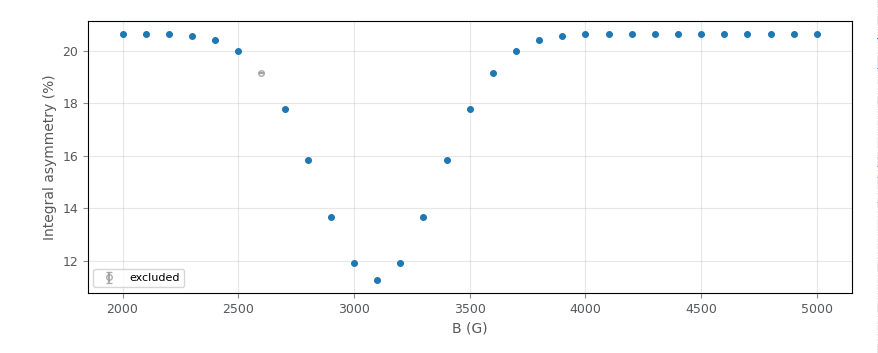
Scan-point exclusion in the integral-scan view: an avoided-level-crossing field scan across a resonance dip, with one run clicked out of the fit. The excluded point draws greyed and hollow — labelled excluded in the legend — and is dropped from the baseline, peak and RF fits, yet stays visible so a second click restores it. This is only one of the six mechanisms in the table above; the other five act on different domains with different semantics (two of them, confusingly, share a start/end time-window label).
Note
The count-fit window is labelled “Skip window (µs)” (drop) as of reconciliation Phase 2, which also gave it a persisted schema key. The MaxEnt window is still labelled “Exclude from / to (μs)”; Phase 3 relabels it “De-weight window (µs)” to encode that it de-weights rather than drops. This glossary’s MaxEnt label column is updated when that phase lands.
See also
Count-domain fitting (α calibration & single histograms) — the count-fit window and the count model.
Fourier analysis — the MaxEnt exclude window.
Frequency-domain conditioning — the Fourier exclusion table and the diamagnetic band.
Detector exclusion — excluding a detector at reduction time.
Integral scan mode (avoided-level-crossing field scans) — excluding a run’s point from an integral (ALC) field scan.